Classic Words Solo
Lulo AppsWord
4.519.77K Reviews
- Version
- Varies With Device
- Installs
- 10.00M
- Age Rating
- Everyone
Screenshots
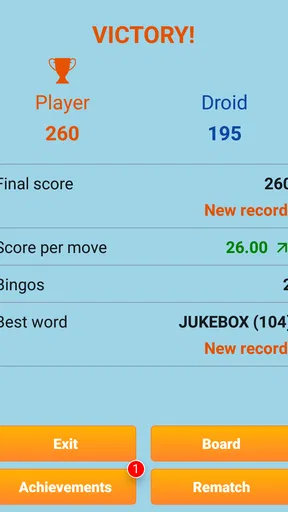
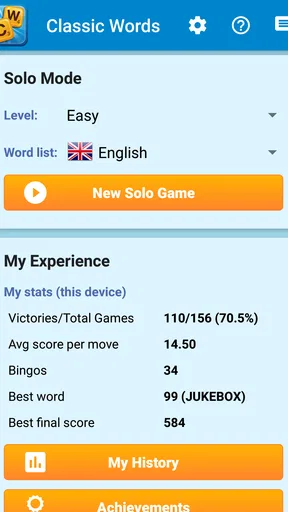

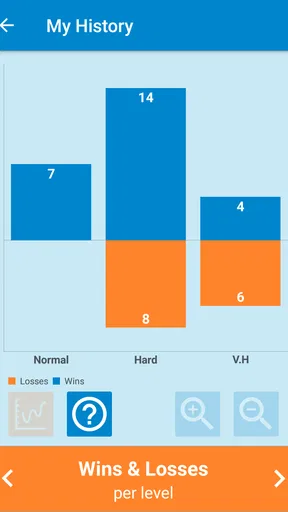
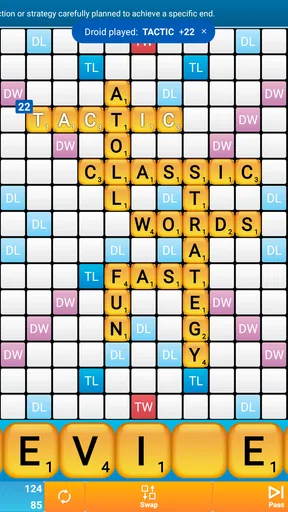
Our Review of Classic Words Solo
 Analysis by Appyee
I like word games that let me start playing immediately, but I also want enough depth to make a second or third session feel different from the first. Classic Words Solo fits that space well. It is a free word game from Lulo Apps built around solo play against smart computer opponents, with definitions available while I play. That combination makes it approachable for a quick break, yet useful for anyone who wants to improve at forming words rather than simply pass time.
The basic idea is familiar: I place letters on a board, build words from my rack, and try to finish with a higher score than the computer. What makes the experience comfortable is that I do not need another person online, a social account, or a scheduled match. I can open it when I have a few quiet minutes, play at my own pace, and stop after a single game without leaving anyone waiting.
After spending time with it, I see Classic Words Solo as a focused solo word game rather than a broad collection of modes. That focus is its main strength. It avoids the clutter of many modern puzzle apps, although players looking for tournaments, conversation, animated rewards, or a large multiplayer community may find it deliberately simple.
How a normal game feels from the first move
The first useful habit is to treat the opening rack as a planning problem, not a race to place the longest word. I usually look for a safe opening that uses awkward letters without giving the computer an easy premium-square opportunity. That approach matters because a flashy word can create a strong reply if it opens valuable board space.
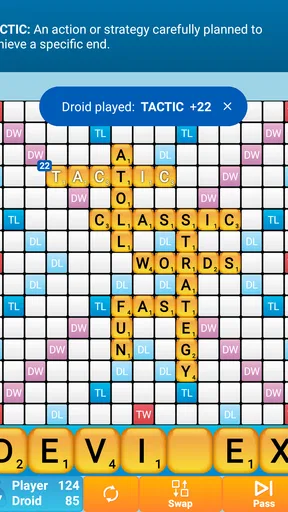
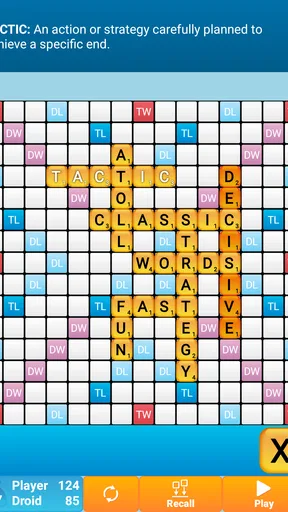
The board gives the game its lasting interest. A word is not judged only by its letters; its position changes the value of the move and the possibilities left for the next turn. I pay attention to bonus squares, parallel placements, and spots where a short word can connect with an existing one. A modest-looking play can be better than a longer word when it controls the board and keeps a flexible rack.
This is where the built-in definitions become genuinely useful. When I encounter an unfamiliar word, I can check its meaning instead of treating it as a mysterious legal arrangement. That turns a disputed-looking move into a small learning moment. I do not remember every definition immediately, but repeated exposure helps me recognize useful word shapes and understand why certain combinations appear in the game.
The computer opponent also changes the rhythm compared with a casual paper-board session. I am not waiting for another person to think, and I can use the game as a private practice table. A beginner can concentrate on learning placement and vocabulary, while a more experienced player can test habits such as exchanging awkward letters or protecting premium squares.
For an everyday example, I might open the game while waiting for an appointment and play a few turns. If my rack contains difficult consonants, I use the early turns to search for short connecting words rather than forcing a large score. Later, when the board becomes crowded, I look for openings that use a high-value letter efficiently. The session remains worthwhile even if I lose because I have practiced a specific decision instead of merely chasing a result.
Choosing a difficulty that teaches rather than frustrates
The available difficulty choice is important because it affects how I interpret each game. A gentler opponent gives me room to learn the board and definitions. A stronger opponent makes every careless opening more expensive and exposes weak rack management quickly. I recommend starting below your ambition, especially if you know the basic rules but have not played a solo word board game recently.
Once the moves begin to feel predictable, increasing the challenge is more useful than immediately trying to memorize huge word lists. A stronger setting can reveal that my real weakness is not vocabulary but board awareness. I may know a high-scoring word and still lose value by placing it where the computer can build across a bonus square.
This also answers an important question for new players: does the game work for someone who is not already an expert? Yes, provided the difficulty is chosen sensibly. The definitions reduce the intimidation of unfamiliar entries, and solo play removes the pressure of making mistakes in front of another person. It is less suitable for someone who wants a completely casual game with no strategic learning curve, because the board rewards attention.
Settings I would check before settling into a routine
I would not rush past the settings area. In a word game, small presentation and gameplay choices can determine whether a session feels relaxed or unnecessarily demanding. I check the language and dictionary-related options first, because word validity and definitions are central to the experience. If the selected language does not match the vocabulary I want to practice, the game becomes much less useful as a learning tool.
I also look at the difficulty before beginning a serious practice session. Changing it is not a sign that I am playing incorrectly; it is a way to make the game match my purpose. For vocabulary discovery, I prefer a level that leaves time to inspect unfamiliar words. For strategic training, I choose a tougher opponent and focus on avoiding loose openings.
Sound and display preferences are worth adjusting for the setting in which I play. A quiet library or waiting room calls for a restrained setup, while a home session may feel better with normal feedback. I appreciate being able to shape the experience around concentration rather than having the game dictate a noisy or distracting pace.
One setting-related habit has saved me from judging the game unfairly: I separate learning games from test games. During a learning game, I use definitions and take time to understand why a word is valid. During a test game, I try to make decisions without checking every unfamiliar entry. Mixing those goals can make a match feel inconsistent, because I am sometimes studying and sometimes competing without realizing it.
Players often ask whether a word game like this needs a constant internet connection. My practical reason for choosing a solo format is that it does not depend on finding an opponent or maintaining a live conversation. That makes it convenient for offline-style personal practice, although I still recommend checking the current device behavior after installation if uninterrupted access is essential to you.
Small shortcuts that make each turn faster
The most useful shortcut is mental rather than technical: scan the rack in a fixed order. I first search for a strong vowel-consonant balance, then check whether a difficult letter can be attached to an existing word, and finally inspect the board for bonus opportunities. A repeatable scan prevents me from staring at the same letters without making progress.
I also avoid spending too long on one imagined move. If I cannot find a promising placement quickly, I switch from “What is the biggest word?” to “What is the safest useful word?” That change often reveals a short play that improves the rack and keeps the opponent away from valuable spaces.
Definitions can be used as a shortcut to learning, but not as a substitute for thinking. When I look up a word, I note its shape and possible extensions rather than trying to memorize an isolated meaning. For example, I pay attention to common beginnings, endings, and plural forms. That gives the next game practical value because I am building recognition patterns, not just collecting trivia.
A second strong habit is to count the letters I leave behind. I do not need perfect rack arithmetic to benefit from this. Simply noticing that a move leaves several vowels, repeated consonants, or an awkward high-value tile helps me avoid attractive plays that damage the following turn. In solo play, this is especially useful because I can pause and examine my reasoning without social pressure.
Another efficient pattern is to look for parallel placements. A new word that runs beside an existing word may create several smaller words at once. These plays can be easy to miss when I focus only on open spaces. They are also a good reason not to fill every attractive gap immediately; preserving a narrow lane can create more options than closing the board too early.
I have found it helpful to keep a simple personal rule for premium squares: do not open one casually. If I cannot use the bonus myself, I consider whether the computer can reach it on the next turn. This is not a guaranteed defensive system, but it changes my attention from immediate points to the opponent’s possible reply.
What experienced play looks like after the basics
With practice, the game becomes less about discovering whether I can make a word and more about controlling the number of good replies available. I compare candidate moves by asking three questions: how much does this score, what does it leave on my rack, and what does it offer the computer? That three-part check is more reliable than choosing the longest visible word.
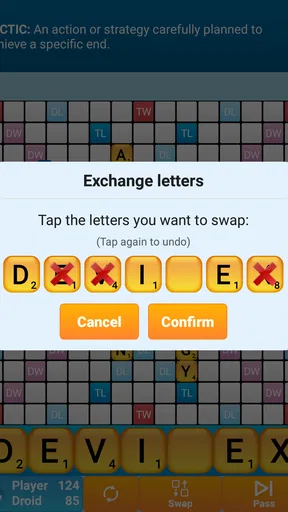
Exchanging letters is another advanced decision. It can feel wasteful because it may produce little or no immediate score, but holding an unusable rack can be worse. I consider an exchange when the letters do not combine naturally, when the board offers no safe placement, or when a single awkward tile is blocking several possibilities. The right choice depends on the board, so I avoid treating exchanges as either always good or always bad.
I also try to preserve flexible letters when the board is becoming crowded. A balanced rack gives me more ways to connect with existing words, while a collection of repeated consonants can leave me dependent on a lucky opening. This is one of the clearest differences between beginner and experienced play: strong players are often preparing the next turn while making the current one.
The definition tool adds a second layer to this process. I use it after the move to confirm what I learned, then try to remember the word’s useful construction. Over time, that creates a personal vocabulary of short connectors and uncommon letter patterns. It is a slower route than memorizing a competitive word list, but it feels more meaningful for players who want to understand the language as well as score.
For families, the Everyone content rating makes the game easy to consider as a shared vocabulary activity, though the solo format means people are not taking turns on the same board in the usual way. A parent can use it as a quiet practice tool, and a child who enjoys spelling can explore words without facing an online opponent. The main requirement is patience with the strategic side, since a simple interface does not mean every move is simple.
Where the simple design starts to feel limited
The same focus that makes the game easy to enter can make it feel narrow after long-term use. If I want live competition, player profiles, chat, seasonal events, or a large collection of unrelated puzzles, this is not the right destination. Its appeal comes from the board, the computer opponent, and the definitions; players seeking constant novelty may prefer a broader word-game platform.
The computer also changes the emotional feel of a match. A solo opponent is convenient, but it cannot replace the humor, surprise, and personal rivalry of playing with friends. Some people enjoy analyzing a quiet board, while others need the social element to stay interested. I would choose this game for dependable practice and choose a multiplayer alternative when the main goal is connection.
There is also a learning trade-off. Definitions can make unfamiliar words less frustrating, but frequent checking may interrupt the flow and encourage me to play reactively. I get better results when I decide first, check second, and only then think about how the word might help in a future position. Players who want a pure speed challenge may find that this reflective approach slows the game.
Another limitation is that solo difficulty can become a narrow measure of progress. Winning against a computer is satisfying, but it does not automatically prove that I would perform equally well against a human who uses a different style. I therefore judge improvement by several signs: better rack balance, fewer careless premium-square openings, and more confidence finding connecting plays.
Who should install it and who should pass
I recommend Classic Words Solo to anyone who enjoys traditional word-board strategy but wants a private, flexible opponent. It is particularly good for learners who appreciate definitions, people who want a calm alternative to fast multiplayer matches, and experienced players who are willing to use solo games as deliberate practice.
I would be more cautious about recommending it to someone who needs a strong social layer. If your favorite part of a word game is sending reactions, competing with friends, or watching a live ranking change, the focused solo format may feel lonely. I would also point elsewhere if you want a constantly changing puzzle catalog rather than repeated improvement on one core system.
The game is free, which makes trying it straightforward, and its long presence on mobile is reflected in a large audience: it has passed ten million installs, with an average rating of 4.5 from roughly two hundred ten thousand ratings. Those figures do not replace personal preference, but they match my impression that the concept is easy to understand and dependable for its intended audience.
My final verdict after building a repeatable routine
Classic Words Solo works best when I treat it as a small training table rather than a disposable time filler. I choose a sensible difficulty, check the language and presentation settings, scan the rack consistently, protect valuable board spaces, and use definitions to learn patterns instead of merely confirming moves. Those habits make the game more rewarding without requiring complicated systems.
Lulo Apps has kept the experience centered on what matters: placing words, reading the board, and making better decisions against a computer. I like that I can play one short session or settle into a longer match without needing a community around me. The limitations are clear, but they are mostly the result of focus rather than poor execution.
My recommendation is simple: install it if you want a free, accessible word game for solo practice with enough strategy to reward attention. Start gently, use the built-in definitions deliberately, and raise the challenge only after your moves feel intentional. If you need social competition or endless variety, choose another kind of app. For quiet vocabulary practice and classic board thinking, though, Classic Words Solo remains an easy game for me to return to.
Verdict
Strengths of Classic Words Solo
- Works completely offline, making it useful during travel or without mobile data.
- Simple interface loads quickly and is easy to understand for all ages.
- Offers several difficulty levels for gradual improvement.
- Helpful hints can support beginners when they get stuck.
- Small app size uses little storage and battery.
Limitations of Classic Words Solo
- Limited visual variety may feel repetitive after extended play sessions.
- Solo gameplay lacks multiplayer competition or social interaction.
- Some advanced features may require watching advertisements.
- Word validity can occasionally differ from your preferred dictionary.
- Players seeking fast action may find the turn-based pace too slow.
Other Releases by Lulo Apps
View All
Classic Words Plus
Word4.5
Similar Picks in This Category
View All
Word Search - Word Puzzle Game
Bluetile4.8

Word Search Quest - Puzzles
Blackout Lab4.8

CodyCross: Crossword Puzzles
Fanatee, Inc.4.7

Words of Wonders: Crossword
Fugo Games4.9

Wordscapes: Word puzzle game
PeopleFun4.7

Word Search Explorer
PlaySimple Games4.9
Frequently Asked Questions
What is Classic Words Solo?
Classic Words Solo is a single-player word game based on the familiar rules of crossword-style board games. You form words from letter tiles, place them on a board, and try to achieve a higher score than the computer opponent. It is designed for offline play, making it suitable for quick matches, vocabulary practice, and relaxed gameplay without needing to compete against other online players.
Can I play Classic Words Solo without an internet connection?
Yes, one of the main advantages of Classic Words Solo is that it can generally be played offline after installation. You can start a match, take your time choosing words, and continue playing without a Wi-Fi or mobile data connection. An internet connection may still be useful for downloading the app, receiving updates, or accessing certain advertising and support features.
Is Classic Words Solo suitable for beginners?
Classic Words Solo is accessible to beginners because the gameplay is based on straightforward word-placement rules, and the interface is relatively easy to understand after a short introduction. You can begin with simpler difficulty settings and gradually increase the challenge as you improve. However, players unfamiliar with crossword board games may need a few rounds to learn scoring, bonus squares, and tile management.
Does Classic Words Solo offer different difficulty levels?
Yes, Classic Words Solo includes multiple difficulty settings intended to accommodate different skill levels. Beginners can choose an easier opponent while learning how to build words and use premium board spaces. More experienced players can select stronger computer opponents for a tougher challenge. The difficulty affects how competitive the matches feel, although the computer’s word choices may sometimes seem unexpectedly advanced.
Is Classic Words Solo free to download and play?
Classic Words Solo can typically be downloaded and played for free, allowing users to enjoy its core word-game experience without purchasing the app upfront. Depending on the version and platform, the game may include advertisements or optional in-app purchases, such as an ad-free option or additional features. Before downloading, check the official store listing for current pricing, permissions, and purchase details.
Play our best games!


